beta

From idea to router.

Korpora designs panel furniture in the browser and turns the same project into everything the workshop needs: a cut list with edge banding, a hardware list, drawings with a drilling map for every part, and files for the CNC machine.

Every new account gets a 30-day trial, starting when the email is confirmed, to try the software. No card and no automatic payment.

How do the sizes get to the machine?

In four steps, in one project. Changing a size updates everything after it: the model, the cut list, the drawings and the G-code.

  1. Sizes and fronts

    Choose the type of furniture and set the sizes, doors, drawers and shelves. Decor, edge banding, hinges, handles and slides come from the catalogue.

  2. 3D model

    The furniture is assembled from real parts with thickness, edge banding and grain direction. The program checks shelf sag, door weight against the hinges and holes close to an edge.

  3. Cut list and hardware

    A list of parts with cut sizes after edge banding, nesting on sheets, and the hardware counted out, ready to order.

  4. Drawings and CNC

    An assembly drawing, a drawing with a drilling map for every part, layered DXF and G-code for every sheet.
What comes out of one project?

The real files of the same example kitchen: the cutting sheet with the router path, the parts of the first unit and the start of the G-code.

Sheet 1 of 6 for a kitchen of 3 × 600 + 1 × 500 mm: 20 parts and 591 holes. Program output, not an illustration. contour, Ø10 cutter back panel groove, Ø4 cutter holes Ø5, Ø7, Ø3
Cut list excerpt: 9 of 86 parts
No. Part Finished, mm Cut, mm Band, length Band, width Holes
P01 Left side 760 × 560 × 18 760 × 559 1 — 49
P02 Right side 760 × 560 × 18 760 × 559 1 — 49
P03 Bottom 564 × 560 × 18 564 × 559 1 — —
P04 Front rail 564 × 100 × 18 564 × 100 — — 2
P05 Back rail 564 × 100 × 18 564 × 100 — — 2
P06 HDF back panel 747 × 578 × 3 747 × 578 — — —
P07 Left door 757 × 297 × 18 753 × 293 2 + 2 2 + 2 5
P08 Right door 757 × 297 × 18 753 × 293 2 + 2 2 + 2 5
P09 Shelf 562 × 520 × 18 562 × 519 1 — —
The first base unit of the same kitchen: 9 of 86 parts. The cut size is already reduced by the edge banding thickness.
%
O1001 (KORPORA - SHEET 1/6)
(SPEC SHA256 9ff852c889a49f7b - POST iso-2.1)
(STOCK PB18 2800X2070X18 - Z0 TOP OF SHEET - XY0 LOWER LEFT)
(SIMULATE AND DRY RUN BEFORE CUTTING)
G21 G17 G90 G94 G40 G49 G80
G54
(T1 DRILL D5 - 479 HOLES)
G91 G28 Z0
G90
T1 M6
S6000 M3
G0 G43 H1 Z20.
G98 G81 X46. Y74. Z-12. R3. F2000
X46. Y106. Z-12. R3.
X46. Y138. Z-12. R3.
The start of the G-code for sheet 1 of 6: header, tool change and the G81 drilling cycle.

Where exactly do the holes go?

On the drawing of every part: coordinates, diameter and depth of every hole, following the hardware manufacturer's documentation — Blum, Hettich, GTV and Salice for hinges, GTV and Blum for slides.

  • A Ø35 cup 5.5 mm from the door edge: that is what the Blum CLIP top table gives for a 16.5 mm overlay with a 0 mm plate.
  • Mounting plates and shelf supports follow the 32 mm system: the first row is 37 mm from the front edge.
  • Handles are drilled at the hole spacing of the chosen model, slides to the manufacturer's template.
  • Horizontal holes in the edges (for confirmat screws) are in the drawing's table, separate from the G-code.
  • If a hinge, slide or hole falls outside the manufacturer's table, the program tells you what to change. Where the document says nothing, the program decides and marks the value “наш избор” (our choice).
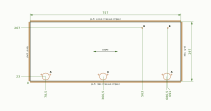
Drawing of a 757 × 297 mm door with sizes, edge banding and the drilling map for the hinge cups Hinge cup detail at 1:1 scale: Ø35 at 5.5 mm from the edge
The left door of the first base unit, 757 × 297 mm: sizes, edge banding and drilling map. Drawing labels are in Bulgarian. Open the whole drawing

What can you design?

Panel furniture for the kitchen, bedroom, living room and study — from a single cabinet to a whole kitchen.

Kitchen and cabinets

  • Base cabinet width 300–1,200 mm
  • Wall cabinet width 300–1,200 mm
  • Tall cabinet width 300–1,200 mm
  • Kitchen run 2–6 units of 400–900 mm

Bedroom

  • Wardrobe width 800–3,000 mm
  • Chest of drawers width 400–1,600 mm
  • Bedside table width 350–650 mm
  • Bed mattress 90–200 cm

Living room and study

  • Bookcase width 400–2,400 mm
  • TV unit width 1,000–2,600 mm
  • Desk width 900–1,800 mm
  • Living-room wall unit width 2,200–3,600 mm

The front views are the engine's output at the default sizes, all at one scale.

The construction follows workshop practice: the bottom and top sit between the sides, the HDF back goes into a groove, base cabinets have rails for the worktop, and cut sizes are reduced by the edge banding.

What does the machine get?

Layered DXF and G-code for every sheet of the nesting. The cut list, hardware and drilling tables download separately.

Layered DXF R12
The layer name carries the operation, tool and depth, so the CAM program maps them without guessing. The layers of the sheet at the top of this page:CONTOUR_D10_Z-18_3DRILL_D3_Z-10DRILL_D5_Z-12DRILL_D5_Z-19_5DRILL_D7_Z-19_5GROOVE_W4_Z-8
G-code ISO / Fanuc
G81 drilling cycle, G43 tool length compensation and tool changes with T… M6.
G-code GRBL
For GRBL machines: the program stops for a manual tool change and Z zeroing.
CSV tables
Cut list, hardware and every hole — semicolon-separated, they open straight in Excel and LibreOffice.
The whole project as ZIP
Drawings, DXF and G-code for every sheet, the tables and the project specification in one archive.
SVG drawings
An assembly drawing and a drawing of every part in A3 format, ready to print.

The post-processors are generic, not made for a specific controller. Before the first cut, run the program in a simulation and as a dry run above the sheet, and check the zero point, tools and spindle speeds against your machine.

How much does it cost?

Every account gets a 30-day trial, starting when the email is confirmed, to try our software — with all features, no card and no automatic payment.

  • 1 month €30 €30 per month €25 excl. VAT
  • 3 months €85.50 €28.50 per month €71.25 excl. VAT 5% off
  • 6 months €162 €27 per month €135 excl. VAT 10% off
  • 12 months €288 €24 per month €240 excl. VAT 20% off
  • Lifetime €900 one-off, for the life of the service €750 excl. VAT
  • For consumers, prices are final and include 20% VAT. For businesses the price without VAT is also shown; VAT is charged under the rules of the buyer's country.
  • Lifetime costs 2.5 times the yearly price without the 12-month discount and is valid for as long as Korpora is offered — details in the terms and conditions.
  • You order a plan from your account, and it is activated manually once the payment arrives.
  • When the trial or a paid period ends, your projects stay available to download. New projects and changes need an active plan.

Questions and answers

What does “beta” mean?

Korpora is in open beta: the features on this page are available and every output is real, but the software is still being refined with the feedback of the first workshops — so check the outputs before production. Tell us what is missing or not right — at info@carbonstealth.eu.

How much does Korpora cost?

€30 per month including VAT (€25 excluding VAT). Paying for 3, 6 or 12 months at once gives a discount of 5%, 10% and 20% respectively. Lifetime costs €900 including VAT (€750 excluding VAT), is paid once and is valid for as long as Korpora is offered.

What happens when the trial ends?

Your projects stay in the account and you can download them: cut list, hardware, drawings and CNC files. A new project or a change to an old one needs Premium or Lifetime.

Do I need to install anything?

No. Korpora runs in the browser — Chrome, Edge, Firefox or Safari on a computer with WebGL 2. Projects are kept on the server, not on your computer.

Which CNC machines does it work with?

The program gives a layered DXF R12 in millimetres for your CAM program, and G-code in two flavours: ISO/Fanuc and GRBL. The post-processors are generic, so the first cut goes through a simulation and a dry run.

Whose hardware does it support?

Hinge drilling follows the documentation for Blum CLIP top, Hettich Sensys, GTV and Salice Series 200; drawer slides follow GTV H45 PRESTIGE, Blum TANDEM 560H and Blum MOVENTO 760H.

Which languages is the program in?

The website, account and admin pages are in Bulgarian, English and Italian. The editor, drawings and tables are in Bulgarian for now.

Can I turn on two-factor protection?

Yes. Under “Security” in your account you turn on codes from an app such as Google Authenticator, Aegis or 1Password, and you get 10 recovery codes in case you lose your phone.

Where is my data kept?

On a server in the European Union. Passwords are kept only as Argon2id hashes. The team opens the contents of your projects (sizes, materials, drawings) only for support, and every download is recorded in the audit log; the project name and type are visible in the admin panel.

Can I delete my account?

Yes, under “Data” in your account. Before that you can download all your data; deletion is permanent and removes the projects too. The data stays in the database backups until those expire — the periods are in the privacy policy.

Try it on a real order.

30 days are enough to take one order from the sizes to the machine. If Korpora does not work for you, you pay nothing, and your projects stay available to download.